Drupal 11: Creating A Tabbed Interface With HTMX
这是一系列探讨 Drupal 中 HTMX 的文章的第三部分。上一次,我探讨了 在 Drupal 页面上使用 HTMX 实现“加载更多”功能。在开始研究表单之前,我想举一个使用 HTMX 和控制器来实现某个操作的最终示例。
帮助我理解 HTMX 的一个关键示例是,它被用于创建一个无需重新加载页面的标签式界面。在 Drupal 中重新实现这个功能相当简单,并且可以在单个控制器中完成。
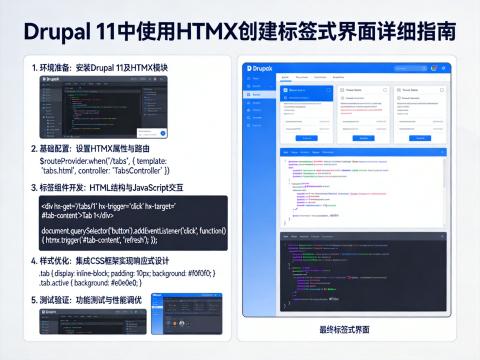
在本文中,我们将在 Drupal 中创建一个标签式界面,其中 HTMX 用于在不重新加载页面的情况下以标签式界面的形式加载数据。
本文中包含的所有代码都可以在 GitHub 上的 Drupal HTMX 示例项目 中找到,但在这里我们将详细介绍代码的功能以及它为生成内容所执行的操作。
首要任务是为我们的控制器创建路由。
一、路由
我们在这里创建的路由只是指向控制器中的一个操作。
drupal_htmx_examples_tabbed:
path: '/drupal-htmx-examples/tabbed'
defaults:
_title: 'HTMX Tabbed'
_controller: '\Drupal\drupal_htmx_examples\Controller\TabbedController::action'
requirements:
_permission: 'access content'当用户(假设他们拥有 访问内容权限)访问路径 /drupal-htmx-examples/tabbed 时,他们将触发控制器中的 action() 方法。
让我们构建此路由指向的控制器。
二、控制器
此路由指向一个控制器,由于这里我们只有一个端点,因此需要使用 Drupal\Core\Htmx\HtmxRequestInfoTrait 特性。为了使用此特性,我们需要注入 request_stack 服务,并创建一个名为 getRequest() 的方法,该方法将从请求栈中返回当前请求。
除了这个特性之外,我将使用 Drupal\Core\Render\MainContent\HtmxRenderer 对象来响应 HTMX 请求。这将使我们能够从响应中返回 HTMX 友好的标记,而无需在链接中添加 _wrapper_format 参数。使用这种技术并非总是必要的,但这个示例将展示在需要时如何实现这一点。
为了能够使用 HtmxRender 对象,我们需要包含 main_content_renderer.htmx 服务,它是一个可用的 HtmxRender 对象。此外,我们还需要一个 current_route_match 服务,调用该对象的 renderResponse() 方法并返回内容时需要用到它。
控制器的初始框架包含一些服务,以便我们具备实现其余功能所需的一切。
<?php
namespace Drupal\drupal_htmx_examples\Controller;
use Drupal\Core\Controller\ControllerBase;
use Drupal\Core\Entity\EntityInterface;
use Drupal\Core\Htmx\Htmx;
use Drupal\Core\Htmx\HtmxRequestInfoTrait;
use Symfony\Component\DependencyInjection\ContainerInterface;
/**
* Controller to show a tabbed region on the page using HTMX.
*/
class TabbedController extends ControllerBase {
use HtmxRequestInfoTrait;
/**
* The request stack service.
*
* @var \Symfony\Component\HttpFoundation\RequestStack
*/
protected $requestStack;
/**
* The HTMX Renderer service.
*
* @var \Drupal\Core\Render\MainContent\HtmxRenderer
*/
protected $htmxRenderer;
/**
* The route match service.
*
* @var \Drupal\Core\Routing\RouteMatchInterface
*/
protected $currentRouteMatch;
/**
* The database service.
*
* @var \Drupal\Core\Database\Connection
*/
protected $database;
public static function create(ContainerInterface $container) {
$instance = new self();
$instance->requestStack = $container->get('request_stack');
$instance->htmxRenderer = $container->get('main_content_renderer.htmx');
$instance->currentRouteMatch = $container->get('current_route_match');
$instance->database = $container->get('database');
return $instance;
}
/**
* {@inheritdoc}
*/
protected function getRequest() {
return $this->requestStack->getCurrentRequest();
}
/**
* Callback for the route drupal_htmx_examples_tabbed.
*
* @return array|\Drupal\Core\Render\HtmlResponse|\Symfony\Component\HttpFoundation\Response
* The render array, or a HTMX renderer response.
*/
public function action() {
}
}这将构成控制器的基础。
接下来,让我们看看如何从数据库中加载数据。
三、从数据库加载页面
我在这个控制器中包含的服务之一是与数据库的连接。这用于从数据库中获取最新的文章,以便我们可以在标签内容中加载它们。这里的想法是,我想要一个易于复制的系统,用于从数据库中获取内容页面。加载前几个项目似乎是一种任何人都可以在自己的网站上轻松复制的不错方法。
以下函数接受一个数字,并将返回数据库中按创建日期排序的该位置的(已发布)文章页面。
/**
* Load the node in position "nth", ordered by date created descending.
*
* @param int $nth
* The position of the node to load, ordered by date created descending.
*
* @return \Drupal\Core\Entity\EntityInterface|null
* The node, or null if the node failed to load.
*
* @throws \Drupal\Component\Plugin\Exception\InvalidPluginDefinitionException
* @throws \Drupal\Component\Plugin\Exception\PluginNotFoundException
*/
protected function loadNthNode(int $nth): ?EntityInterface {
$query = $this->database->select('node', 'n')
->fields('n', ['nid']);
$query->join('node_field_data', 'nfd', '[nfd].[nid] = [n].[nid] AND [nfd].[langcode] = [n].[langcode]');
$query->orderBy('nfd.created', 'desc');
$query->where('n.type = :type', [':type' => 'article']);
$query->where('nfd.status = 1');
$query->range($nth, 1);
$nid = $query->execute()->fetchField();
// Then we load the data accordingly.
$nodeStorage = $this->entityTypeManager()->getStorage('node');
return $nodeStorage->load($nid);
}这有用吗?也许没有,但它适用于大多数 Drupal 网站(只要它们有一个名为“article”的内容类型),因此是一个在不知道网站当前内容的情况下加载内容页面的好例子。
四、控制器操作
控制器操作大致可以分为两部分。首先,我们需要加载内容页面,然后我们需要响应由该页面创建的 HTMX 请求。
首先,让我们为页面创建输出。我们在这里需要做的就是设置一个从 1 到 5 的数字数组,然后使用这些数字渲染一个链接列表。列表中的每个链接都有一个 name 属性,然后标记有用于驱动标签元素的 HTMX 属性。
$range = range(1, 5);
$items = [];
foreach ($range as $item) {
$id = 'page_' . $item;
$items[$id] = [
'#type' => 'html_tag',
'#tag' => 'a',
'#value' => $this->t('Page @number', ['@number' => $item]),
'#attributes' => [
'name' => $id,
'href' => '#',
],
];
(new Htmx())
->get()
->swap('outerHTML')
->target('#detail')
->trigger('click')
->applyTo($items[$id]);
}
$output['list_of_items'] = [
'#theme' => 'item_list',
'#title' => 'Links',
'#items' => $items,
'#type' => 'ul',
];这里使用 Htmx 类为每个链接添加了以下属性。
data-hx-get=""- 这将向当前 URL 发送一个 GET 请求。data-hx-swap="outerHTML"- 此属性意味着我们将用返回的 HTML(请记住 HTMX 使用纯 HTML 工作)替换此元素。换句话说,我们移除这个元素并用响应中的数据替换它。data-hx-target="#detail"- 这设置了请求响应将被放置的目标。我们还没有将这个元素添加到代码中,接下来会添加。data-hx-trigger="click"- 这意味着当用户点击链接时,将运行 GET 请求。
请注意,所有链接都获得了完全相同的属性。我们将在文章后面详细介绍 HTMX 如何能够识别是哪个元素发起了请求。
页面渲染的其余部分用于生成具有 detail id 的 div 元素,内容将被放置在其中。我没有让这个元素为空,而是决定加载列表中的第一个元素并将其渲染为页面的默认内容。为此,我们使用实体类型管理器服务以摘要模式渲染节点,并将其作为 div 元素的子元素添加。
// Load the first node in the database.
$node = $this->loadNthNode(1);
// Convert the node to a render array for the view mode "teaser".
$viewBuilder = $this->entityTypeManager()->getViewBuilder('node');
$renderArray = $viewBuilder->view($node, 'teaser');
$output['tab_content'] = [
'#type' => 'html_tag',
'#tag' => 'div',
'#value' => '',
'#attributes' => [
'id' => 'detail',
],
'children' => $renderArray,
];为了响应请求,我们需要使用在开始时添加到控制器创建方法中的 request_stack、main_content_renderer.htmx 和 current_route_match 服务。
响应的创建方式如下。
return $this->htmxRenderer->renderResponse(
$output,
$this->requestStack->getCurrentRequest(),
$this->currentRouteMatch);当我们从 HTMX 收到的请求包含多个标头时,由于我们在链接元素上添加了 name 属性,因此标头中包含一个 HX-Trigger-Name 标头。我们可以使用 HtmxRequestInfoTrait 特性的 getHtmxTriggerName() 方法读取此标头,该方法返回一个类似 "page_1" 的字符串。
使用这个字符串,我们可以提取用户点击的页面的 ID,并开始将其加载到页面上。
$trigger = $this->getHtmxTriggerName();
$number = str_replace('page_', '', $trigger);响应 HTMX 请求的完整代码如下。
if ($this->isHtmxRequest()) {
// This is a HTMX request, so we create some output and respond with a
// full HTMX Renderer response.
// First we find the element that triggered the request.
$trigger = $this->getHtmxTriggerName();
// Then map to a node by finding the n-th item in the database depending
// on what tab was clicked on.
$number = str_replace('page_', '', $trigger);
$node = $this->loadNthNode($number);
$viewBuilder = $this->entityTypeManager()->getViewBuilder('node');
$renderArray = $viewBuilder->view($node, 'teaser');
// Then, set up the detail div and render it.
$output['tab_content'] = [
'#type' => 'html_tag',
'#tag' => 'div',
'#attributes' => [
'id' => 'detail',
],
'children' => $renderArray,
];
$output['#cache'] = [
'contexts' => [
'url:path',
'url:path.query',
],
'tags' => $node->getCacheTags(),
];
return $this->htmxRenderer->renderResponse(
$output,
$this->requestStack->getCurrentRequest(),
$this->currentRouteMatch);
}除了一些缓存处理以确保节点在其他地方更改时得到更新之外,控制器中的代码基本上就是这些。
让我们看看这里的 HTMX 工作流程。
五、HTMX 工作流程
当用户首次加载页面时,他们将看到一个包含 6 个链接的列表,后面跟着一个包含第一篇文章的 div 元素。
<ul>
<li><a name="page_1" href="#" data-hx-get="" data-hx-swap="outerHTML ignoreTitle:true" data-hx-target="#detail" data-hx-trigger="click">Page 1</a></li>
... links removed for brevity ...
<li><a name="page_6" href="#" data-hx-get="" data-hx-swap="outerHTML ignoreTitle:true" data-hx-target="#detail" data-hx-trigger="click">Page 6</a></li>
</ul>
<div id="detail">
... article 1 ...
</div>假设用户点击了“Page 6”链接,HTMX 将向 /drupal-htmx-examples/tabbed 路由发出请求,该路由将返回以下 HTML。
<div id="detail">