
Drupal 11: Controlling LED Lights Using A REST Service
继我关于Pimoroni Plasma 2350 W的文章之后,我决定利用其Wifi接口做一些有趣的事情,使其连接到Drupal网站。
Pimoroni的Plasma 2350 W固件附带了一个示例,该示例连接到一个免费API以随机更新颜色。当我看到它运行时,我意识到将其修改为从Drupal REST服务中获取数据应该不会太难。
在Drupal中创建RESTful服务非常容易,只需要一个类即可。我所需要做的就是创建一个表单,用于控制REST服务中选择的颜色。
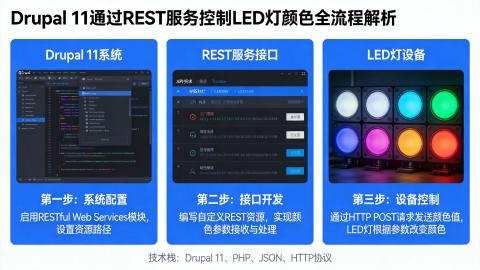
在本文中,我们将探讨创建一个包含RESTful接口的Drupal模块,我们将使用Plasma 2350 W连接到该接口以更新灯光的颜色。
设置表单
为了能够设置LED灯的颜色,我需要创建一个专门用于此目的的表单。
为了将颜色保存到系统中,我们将使用 state 服务。这是一个方便的键值服务,它允许我们将简单的值写入数据库。这个服务是存储那些不属于Drupal配置系统的值的好方法。理想情况下,你希望这些值如果不存在,系统可以轻松重新创建。因此,颜色设置是 state 服务的理想候选对象。
使用注入此服务来设置表单相当简单,但我们还可以通过抽象出 state 本身的获取和设置方法来简化表单集成。
以下是表单类的基本结构。
    namespace Drupal\hashbangcode_plasma\Form;

    use Drupal\Core\Form\FormBase;
    use Drupal\Core\Form\FormStateInterface;
    use Drupal\Core\State\StateInterface;
    use Symfony\Component\DependencyInjection\ContainerInterface;

    class SetColourForm extends FormBase {

      /**
       * The state service.
       *
       * @var \Drupal\Core\State\StateInterface
       */
      protected StateInterface $state;

      public static function create(ContainerInterface $container) {
        $instance = new static();
        $instance->state = $container->get('state');
        return $instance;
      }

      /**
       * Get the colour from the state service.
       *
       * @return string
       *   The colour.
       */
      public function getColourState() {
        return $this->state->get('hashbangcode_plasma.colour', '#ffffff');
      }

      /**
       * Set the colour in the state interface.
       *
       * @param string $colour
       *   The colour to set.
       */
      public function setColourState($colour) {
        $this->state->set('hashbangcode_plasma.colour', $colour);
      }

      public function buildForm(array $form, FormStateInterface $form_state) {
        // Add form here.
      }

      public function submitForm(array &$form, FormStateInterface $form_state) {
        // Add submit here.
      }

    }
这里需要注意的主要一点是,state 服务有一个 get() 方法,它允许我们设置一个默认值。在上面的代码中,这个默认值被设置为纯白色(即 #ffffff)。
这个项目的表单只需要接受颜色并允许提交表单。有趣的是,Drupal自带了一个 “color” 字段类型,它是HTML输入类型 “color” 的包装器。这意味着我们不需要包含任何额外的库来实现颜色选择功能,我们只需要添加一个具有适当类型的字段即可。
    public function buildForm(array $form, FormStateInterface $form_state) {
      $form['colour'] = [
        '#type' => 'color',
        '#title' => $this->t('Colour'),
        '#default_value' => $this->getColourState(),
        '#required' => TRUE,
      ];

      $form['submit'] = [
        '#type' => 'submit',
        '#value' => 'Set Colour',
      ];

      return $form;
    }
HTML的 “color” 字段类型是一个有趣的小知识,虽然它被广泛支持,并且允许通过一个简单的HTML元素进行颜色选择,但我在不同的设备和浏览器上至少看到了3种不同的输入界面。
表单的提交处理程序非常简单。我们只需要从表单状态中提取颜色值,使用我们一开始设置的 setColourState() 方法将其写入 state 服务,然后重新构建表单,以便在页面重新加载后,新的值会显示在表单中。
    public function submitForm(array &$form, FormStateInterface $form_state) {
      $colour = $form_state->getValue('colour');
      $this->setColourState($colour);
      $form_state->setRebuild();
    }
表单基本就是这样,但我们可以使用Drupal的洪水服务(flood service)来防止滥用,从而对其进行一些改进。
一、洪水防护
我不希望的情况是,表单上线后,人们开始每几秒钟就更改一次颜色来滥用它。幸运的是,Drupal有一个内置的名为 “flood” 的服务,它使我们能够通过跟踪在给定时间段内的提交次数,并将其与阈值进行比较,来防止表单被滥用。
为了实现这一点,我们需要像添加 state 服务一样,将洪水服务添加到表单中。
    /**
     * The flood service.
     *
     * @var \Drupal\Core\Flood\FloodInterface
     */
    protected FloodInterface $flood;

    public static function create(ContainerInterface $container) {
      $instance = new static();
      $instance->state = $container->get('state');
      $instance->flood = $container->get('flood');
      return $instance;
    }
然后,我们更新提交处理程序,以便当用户更改颜色时,我们向洪水服务注册他们的交互。在这种情况下,我们使用用户的IP地址来注册这种交互。
    public function submitForm(array &$form, FormStateInterface $form_state) {
      $colour = $form_state->getValue('colour');
      $this->setColourState($colour);
      $form_state->setRebuild();

      // Register flood handler.
      $floodIdentifier = $this->getRequest()->getClientIp();
      $this->flood->register('hashbangcode_plasma.plasma_flood_protection', self::ABUSE_WINDOW, $floodIdentifier);
    }
有了这些之后,我们可以为表单添加一个验证处理程序,以检查洪水阈值的状态。如果用户的提交触发了洪水阈值(设置为10分钟内30次),那么我们将拒绝提交,并向用户显示一条错误消息。
    public function validateForm(array &$form, FormStateInterface $form_state) {
      parent::validateForm($form, $form_state);

      $floodIdentifier = $this->getRequest()->getClientIp();
      if (!$this->flood->isAllowed('hashbangcode_plasma.plasma_flood_protection', 30, 610, $floodIdentifier)) {
        $form_state->setErrorByName('', $this->t('Too many uses of this form from your IP address. This address is temporarily banned. Try again later.'));
      }
    }
如果你想了解更多关于这方面的内容,我之前写过一篇关于 Drupal中洪水系统 的文章,那篇文章中有关于这个系统的更多详细信息。
现在我们有了一个(受保护的)表单,接下来我们可以构建一个REST资源,以便将颜色显示为JSON提要。
创建REST资源
Drupal的API系统非常强大,并且自带了用于格式和认证机制的插件。对于这个项目,我们只需要JSON格式化器和基本的 “cookie” 认证提供程序,它允许对资源进行简单的匿名访问。
要定义一个RESTful API接口,我们首先需要创建一个插件类。这个类将设置端点,并创建为接口提供动力所需的代码。此外,由于我们的颜色存储在 state 服务中,我们将使用依赖注入将该服务注入到类中。
    /**
     * Provides a resource for database watchdog log entries.
     */
    #[RestResource(
      id: "plasma",
      label: new TranslatableMarkup("Plasma resource"),
      uri_paths: [
        "canonical" => "/plasma/[REDACTED]",
      ]
    )]
    class PlasmaResource extends ResourceBase {
    }
我们希望为这个资源定义一个GET方法,因此我们需要创建一个名为 get() 的方法,该方法将由REST服务自动触发。这个方法实际上非常简单,我们将响应负载定义为一个数组,并向其中添加一个名为 “colour” 的字段。然后,我们使用 state 服务从表单设置的状态中提取颜色,或者默认使用纯白色。
通常,当我们从REST资源返回响应时,我们会创建一个新的 Drupal\rest\ResourceResponse 对象,它会处理将有效负载转换为JSON字符串的所有上游格式化操作。但对于这个项目,这种响应类型并不合适,因为它会被Drupal缓存。由于Plasma 2350 W向REST端点发出匿名请求(这样我们就不必在设备上处理认证),表单中所做的更新将不会被获取到。
经过一些实验,我发现对于将被匿名用户使用的RESTful资源,关闭缓存的最有效方法是返回一个新的 Drupal\rest\ModifiedResourceResponse 对象。它的作用与 ResourceResponse 相同,但假设每个响应都是唯一的,因此会防止响应被缓存。我看到很多人建议将缓存的最大年龄设置为0,但这对匿名流量不起作用。
以下是 get() 方法的内容。
    public function get() {
      $colour = [
        'colour' => $this->state->get('hashbangcode_plasma.colour', '#ffffff'),
      ];

      // Do not cache the response.
      return new ModifiedResourceResponse($colour, 200);
    }
REST资源将以200状态码响应,并返回一个小的JSON有效负载。
为了完整起见,以下是完整的REST插件类。
    <?php

    namespace Drupal\hashbangcode_plasma\Plugin\rest\resource;

    use Drupal\Core\State\StateInterface;
    use Drupal\Core\StringTranslation\TranslatableMarkup;
    use Drupal\rest\Attribute\RestResource;
    use Drupal\rest\ModifiedResourceResponse;
    use Drupal\rest\Plugin\ResourceBase;
    use Symfony\Component\DependencyInjection\ContainerInterface;

    /**
     * Provides a resource for database watchdog log entries.
     */
    #[RestResource(
      id: "plasma",
      label: new TranslatableMarkup("Plasma resource"),
      uri_paths: [
        "canonical" => "/plasma/[REDACTED]",
      ]
    )]
    class PlasmaResource extends ResourceBase {

      /**
       * The state service.
       *
       * @var \Drupal\Core\State\StateInterface
       */
      protected StateInterface $state;

      public static function create(ContainerInterface $container, array $configuration, $plugin_id, $plugin_definition) {
        $instance = new static(
          $configuration,
          $plugin_id,
          $plugin_definition,
          $container->getParameter('serializer.formats'),
          $container->get('logger.factory')->get('rest')
        );
        $instance->state = $container->get('state');
        return $instance;
      }

      public function get() {
        $colours = [
          'colour' => $this->state->get('hashbangcode_plasma.colour', '#ffffff'),
        ];

        // Do not cache the response.
        return new ModifiedResourceResponse($colours, 200);
      }

    }
有了这个之后,我们现在需要启用该资源,因为所有REST资源默认都是禁用的。
Drupal没有内置的界面来启用或配置REST资源,但我们可以使用 REST UI模块 来轻松启用Plasma资源,并设置它将使用的方法、格式和认证类型。安装REST UI模块后,我们可以启用Plasma资源,并允许它接受GET请求,现在看起来是这样的。
这将生成一个配置实体,我们可以将其导出并写入Drupal配置目录,然后进行上游部署。
    langcode: en
    status: true
    dependencies:
      module:
        - hashbangcode_plasma
        - serialization
        - user
    id: plasma
    plugin_id: plasma
    granularity: resource
    configuration:
      methods:
        - GET
      formats:
        - json
      authentication:
        - cookie
当然,在没有为资源设置权限的情况下,我们无法访问RESTful接口,所以最后一步是允许匿名用户访问Plasma资源。我在文章中对资源的实际路径进行了模糊处理,但一旦访问,我们会看到以下输出。
{"colour":"#ffffff"}
通过颜色表单更改此颜色并刷新REST资源,我们将看到新的颜色。
{"colour":"#19bbbe"}
现在Drupal中的所有设置都已完成,接下来让我们看看如何使用MicroPython从API中获取颜色并更改灯光的颜色。
编写MicroPython代码
正如我之前提到的,Pimoroni的Plasma 2350 W固件附带了一个 MicroPython脚本,该脚本连接到一个包含颜色的免费API。每120秒,MicroPython会连接到这个API,将找到的十六进制代码转换为RGB值,并更新LED灯的颜色。
我需要做的是更新使用的URL,并减少更新之间的时间间隔。这只是在脚本中更改URL变量的问题。
URL = "https://www.hashbangcode.com/plasma/[REDACTED]"
我们的自定义JSON提要使用的字段与原始提要不同,所以我们只需要更新从提要中提取该值的代码。
    # extract hex colour from the data
    hex = j["colour"]
以下是完整的脚本,它与原始脚本非常相似,但我稍微简化了一些内容。
    import time

    import urequests
    from ezwifi import connect